The best Kindle in 2026: our recommendations for every type of reader
We've tested every Amazon e-reader to recommend the very best Kindle for every bookworm and budget


Looking for the best Kindle? We don’t blame you. Amazon’s Kindle devices are the most popular e-readers around for a reason, with a great selection of titles to boot. Over the years, they’ve become incredibly good at replicating the experience of reading a book on their digital screens without the eye strain caused by more conventional tablets. And with the benefit of the electronic format being that you can access an entire library on a single, highly portable gadget.
They also make reading cheaper and ebooks are more environmentally friendly than that pile of paperbacks you’ve been nursing, so e-readers have an awful lot going for them. The only real issue is deciding which Kindle to buy – but we can help with that.
There are now three base Kindle models to choose from and each one does something a bit different, so read on as we reveal the best Kindle to buy for most people and help you find the Amazon e-reader that’s right for you, and if you want to check out other brands, check out our best e-readers guide.
Why you can trust Stuff: Our team of experts rigorously test each product and provide honest, unbiased reviews to help you make informed decisions. For more details, read how we test and rate products.
Quick list: what’s the best Kindle?
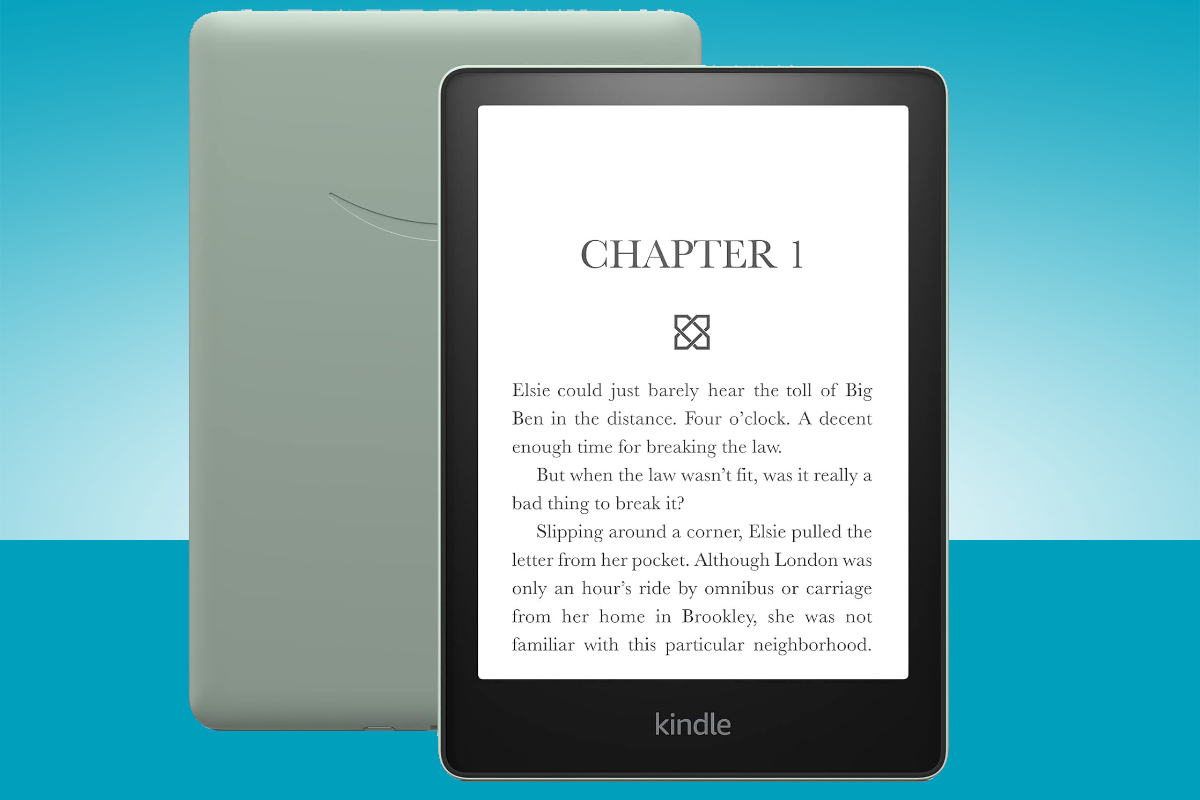
The Amazon Kindle Paperwhite (buy now) is arguably the definitive Kindle, with a classic design and feature set that should suit most people – especially as the latest model comes with a number of upgrades.
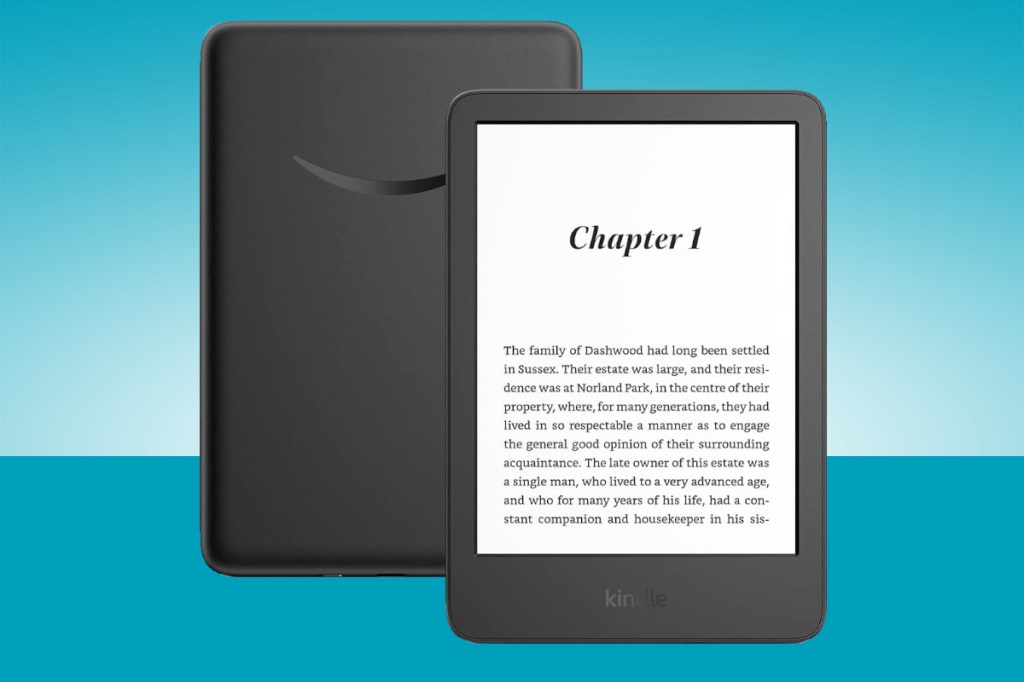
The Amazon Kindle (buy now) might not be its flashiest e-reader, but for a lot of people, it’s all they’ll ever need.
The Amazon Kindle Scribe (buy now) is a brand new Kindle category for Amazon, thanks to its special ability — namely, a screen that’s capable of being doodled and written on, thanks to an included stylus Pen.
The Amazon Kindle Kids Edition (buy now) comes with a year’s free subscription to Kids Unlimited and a two-year breakage guarantee.
The Kindle Colorsoft (buy now) opens up new avenues for Kindle. It takes the most popular Kindle form – Paperwhite – and gives it a twist to make things like travel books or graphic novels come to life.
The best Kindle you can buy today:
Best Kindle overall
1. Amazon Kindle Paperwhite
Stuff Verdict
The Kindle almost everyone should buy remains the Kindle almost everyone should buy
Pros
- Slim, light and easy to hold
- Higher contrast screen and faster page turns great for reading
- Battery champion
Cons
- You’ll notice the extra weight over previous versions
- Don’t want ads? You’ll have to pay more
| Specifications | Amazon Kindle Paperwhite |
|---|---|
| Display | 7in E Ink Carta 1300, 300ppi (B&W), 12 white LEDs, 13 amber LEDs |
| Storage | 16GB/32GB |
| Connectivity | Wi-Fi |
| Battery Life | 12 weeks, wireless charging |
The Kindle Paperwhite (2024) retains its signature slim, lightweight design while featuring a slightly larger 7-inch E Ink Carta 1300 display with higher contrast and faster page turns. It has a sharper, more even front light with adjustable warmth.
Storage has doubled to 16GB, accommodating thousands of books, and battery life now stretches to 12 weeks on a single charge. Charging is faster, and wireless charging is supported.
The device carries an IPX8 waterproof rating for durability near water. It’s priced at $160/£160.
Why we chose it
We gave the Paperwhite a stellar 5-star rating for its subtle but meaningful upgrades. The improved front light is perfect for reducing eye strain during bedtime reading, and despite being slightly heavier, it remains comfortable to hold – though a grippier design would be welcome.
The software stays intuitive, though ads on the home screen and limited file-transfer options may irk some users.
It’s ideal for new e-reader users or those upgrading from older models, but 2021 Paperwhite owners may find the changes too minor to justify an upgrade.
- Read more: Kindle Paperwhite review
Best cheap Kindle
2. Amazon Kindle
Stuff Verdict
The standard Kindle is hands down the best entry-level e-reader for anyone looking to dive into the world of digital books.
Pros
- Affordable price
- 6-weeks battery life
- USB-C
Cons
- You’ll miss the warm backlight for night reading
| Specifications | Amazon Kindle |
|---|---|
| Display | 6in display with built-in light, 300 ppi |
| Storage | 16 GB |
| Connectivity | USB-C, Wi-Fi |
| Battery Life | 6 weeks |
The 2022 Kindle is a lightweight, compact e-reader with a 6″ high-resolution display that delivers crisp, paper-like text. It offers adjustable brightness and dark mode for comfortable reading in any lighting.
Storage sits at 16GB, enough for thousands of books, and battery life lasts up to 6 weeks on a single charge.
Why we chose it
We rate this as hands down the best entry-level e-reader for anyone diving into digital books. It’s so easy to use that the whole experience feels seamless from the start, and the display is perfect for newcomers without overwhelming them with too many features.
What we really love is how it strips away distractions – there are no apps or notifications to pull you out of your story. The long battery life means you can forget about charging it for ages.
If you’re new to e-readers and want something simple, affordable, and built for reading, this is the way to go.
Best Kindle for kids
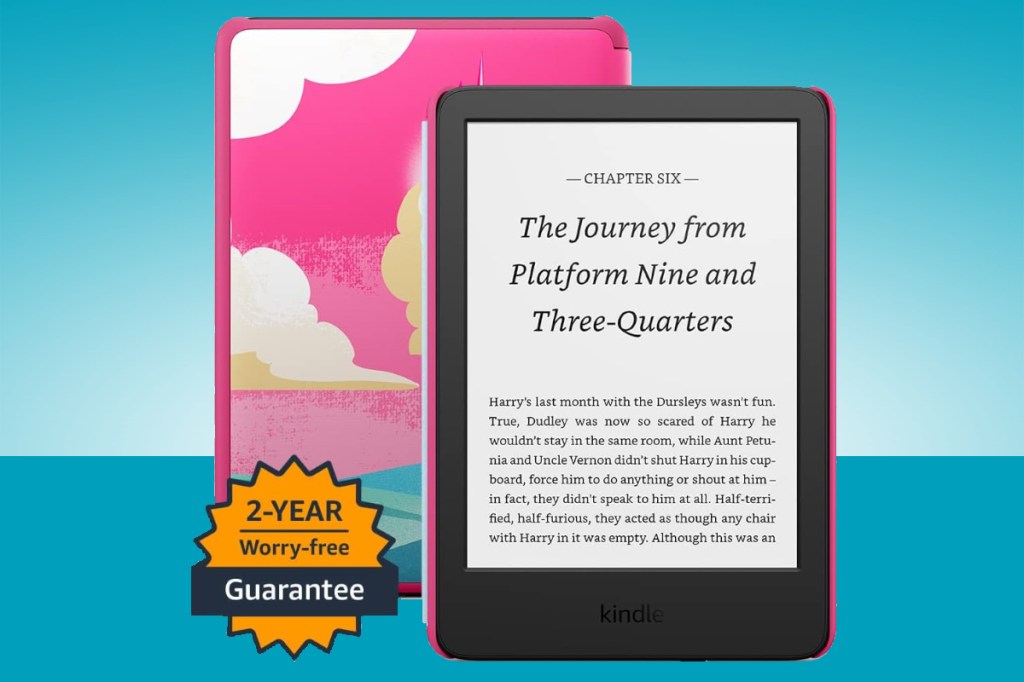
3. Amazon Kindle (Kids Edition)
Stuff Verdict
The Kindle for Kids isn’t perfect but it’s easily the best e-reader you can buy for children
Pros
- Sturdy build and good screen
- Two-year replacement scheme
- Safe environment
Cons
- Lack of colour options
- Slightly sluggish performance
- A few gaps in the library
| Specifications | Amazon Kindle (Kids Edition) |
|---|---|
| Display | 6in display with built-in light, 300 ppi |
| Storage | 16 GB |
| Connectivity | Wi-Fi |
| Battery Life | 6 week |
The Amazon Kindle Kids Edition is built on an 11th-generation Kindle with a 6-inch, 300ppi high-resolution glare-free display, 16GB of storage, and a longer-lasting battery compared to earlier models. It includes a protective case, a one-year subscription to Amazon Kids+ (previously Fire for Kids Unlimited), and a two-year replacement guarantee.
Battery life can last up to six weeks, depending on usage, especially with the front light and wireless turned off. It lacks the waterproofing found in higher-end models.
The child-focused software offers features like Awards for reading goals, Word Wise for vocabulary building, and Vocabulary Builder to help children tackle challenging words.
Why we chose it
The Kindle Kids Edition is designed to encourage children to read, with a sturdy, colourful build and kid-friendly features that make it a solid deal for parents. Its child-proof design ensures durability, and the device is purpose-built for reading rather than apps or games – though it may lag slightly when handling images.
The selection in Amazon Kids+ includes popular series like Harry Potter and Big Nate, though some well-known titles, such as Diary of a Wimpy Kid, may still be missing depending on licensing agreements.
Overall, it’s a well-built, distraction-free device with enough features to justify its price, particularly for families looking to encourage reading. While it’s not perfect and lacks waterproofing, it remains one of the best e-readers available for children.
- Read more: Amazon Kindle (Kid Edition) review
Best Kindle to buy for notetakers
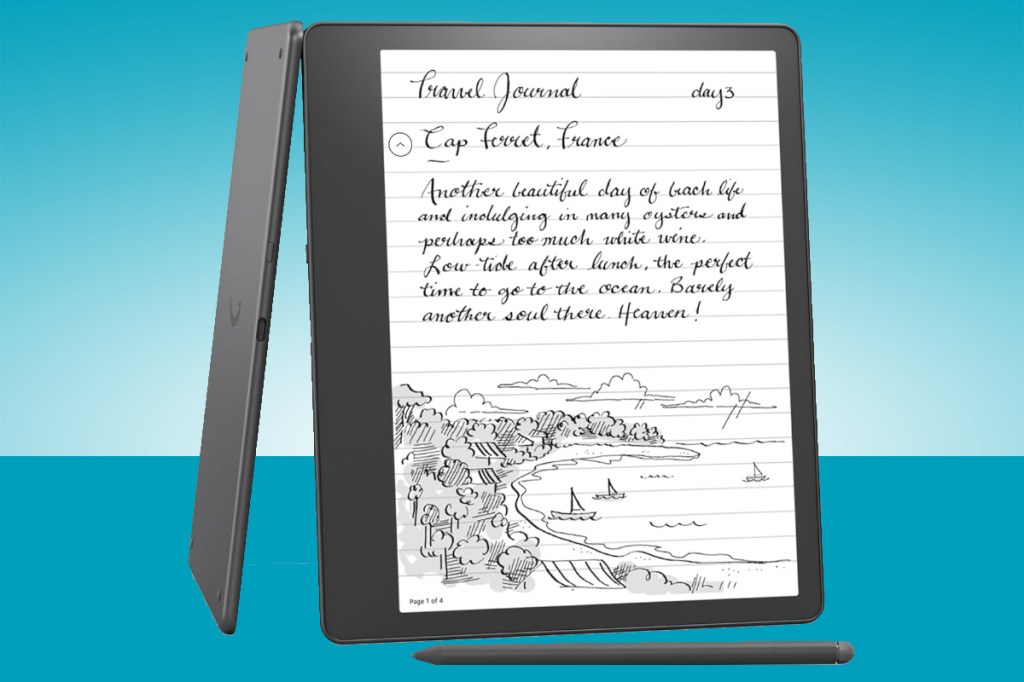
4. Amazon Kindle Scribe
Stuff Verdict
It’s a beautiful ereader and notepad, but so very expensive – and handwriting-to-text recognition is badly needed to push things on.
Pros
- What a nice-looking tab
- The pen is pretty light
- Writing on the screen is lovely
Cons
- Needs writing recognition pronto
- Navigation isn’t the best
| Specifications | Amazon Kindle Scribe |
|---|---|
| Display | 10.2in 300ppi Paperwhite with built-in light |
| Storage | 16, 32, or 64 GB |
| Connectivity | USB-C, 2.4/5GHz Wi-Fi |
| Battery Life | 12 weeks |
The Kindle Scribe features a 10.2-inch, 300ppi display and includes a stylus pen that lets you write and doodle directly on the screen. The stylus is passive, meaning it never needs charging, and magnetically attaches to the body of the Scribe for easy storage.
At just 5.8mm thin, the Scribe is slim enough to fit into even the smallest bags. There’s also a dedicated notebook app for jotting down ideas outside of books and documents.
You can choose between a Basic or Premium Pen, with the Premium Pen adding a shortcut button and a dedicated eraser for faster editing.
Why we chose it
The Kindle Scribe represents a brand new category for Amazon, thanks to its stylus-powered screen. It’s clearly aimed at serial notetakers and annotators, promising to recreate the feel of writing on actual pen and paper.
If you’re the type to jot notes on work documents and revision material, or simply like supplementing your reading with notes and reminders, this is the only Kindle that should be top of your list.
Ultimately, if you’re looking for the best Kindle in 2023 for taking notes, the Scribe is the best, and only, option.
- Read more: Kindle Scribe review
Best colour Kindle
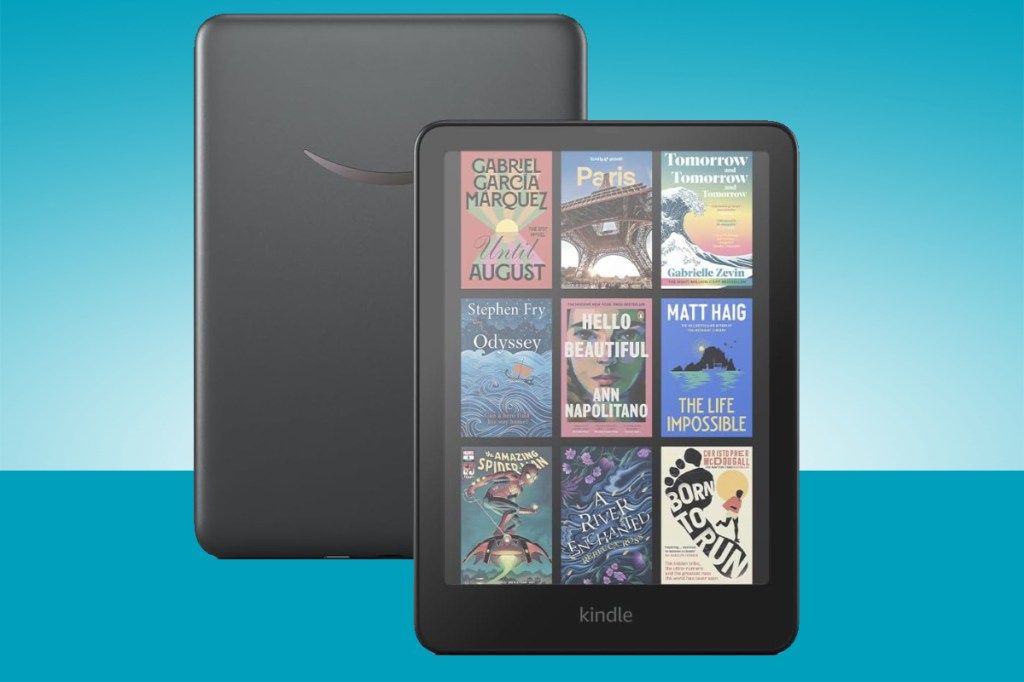
5. Amazon Kindle Colorsoft
Stuff Verdict
Color opens up new avenues for Kindle. It takes the most popular Kindle form – Paperwhite – and gives it a twist to make things like travel books or graphic novels come to life.
Pros
- Colour for book covers
- Faster page turning
- Wireless charging
Cons
- Colour not as sharp as B&W text
- Battery life reduced
- Price vs competition
| Specifications | Amazon Kindle Colorsoft |
|---|---|
| Display | 7in Colorsoft, 300ppi (B&W); 150ppi color |
| Storage | 32GB |
| Connectivity | USB-C, 2.4/5GHz Wi-Fi |
| Battery Life | 8 weeks, wireless charging |
The Amazon Kindle Colorsoft brings colour to the Kindle lineup for the first time. It has a 7-inch display that’s sharp for text at 300ppi, though colour elements render at a softer 150ppi. It’s priced at $270/£270.
Why we chose it
We see this as an exciting step forward for the Kindle range, especially appealing to readers who love vibrant book covers or occasionally dive into graphic novels. It’s perfect for travel guides or cookbooks, though the price feels steep, especially given the reduced battery life.
For most of our reading – novels and black-and-white content – we’d stick with the Paperwhite, but if colour’s been a dealbreaker for you, this could be the Kindle you’ve been waiting for.
- Read more: Kindle Colorsoft review
Kindle specs comparison table
| Specifications | Amazon Kindle Paperwhite | Amazon Kindle | Amazon Kindle (Kids Edition) | Amazon Kindle Scribe | Amazon Kindle Colorsoft |
|---|---|---|---|---|---|
| Display | 7in E Ink Carta 1300, 300ppi (B&W), 12 white LEDs, 13 amber LEDs | 6in display with built-in light, 300 ppi | 6in display with built-in light, 300 ppi | 10.2in 300ppi Paperwhite with built-in light | 7in Colorsoft, 300ppi (B&W); 150ppi color |
| Storage | 16GB/32GB | 16 GB | 16 GB | 16GB/32GB/64GB | 32GB |
| Connectivity | Wi-Fi | USB-C, Wi-Fi | Wi-Fi | USB-C, 2.4/5GHz Wi-Fi | USB-C, 2.4/5GHz Wi-Fi |
| Battery Life | 12 weeks, wireless charging | 6 weeks | 6 week | 12 weeks | 8 weeks, wireless charging |
What to look for when buying a Kindle
When buying a Kindle, display quality is a key consideration. The most important thing, if you’re an avid reader or someone who spends long hours with your e-reader, is a high-resolution screen. Standard Kindle models typically have a 167ppi display, which is fine for basic reading. However, if you prefer crisper text and sharper images, the Kindle Paperwhite or Kindle Oasis, with their 300ppi screens, offer a more comfortable reading experience. This level of resolution mimics the look of printed paper, reducing eye strain during longer sessions.
Additionally, consider features like an adjustable warm light, available in some models, which lets you control the screen’s brightness and tone for better night-time reading.
Storage is another crucial factor, especially if you have a large digital library or plan to download audiobooks. While basic models usually come with 8GB of storage, higher-end Kindles like the Paperwhite Signature Edition and Oasis offer up to 32GB. This might be necessary if you plan to store a lot of Audible audiobooks, graphic novels, or large PDF files. Keep in mind that Amazon also provides free cloud storage for all purchased content, so the storage space on the device itself is primarily for offline access.
Battery life is always a priority when buying an e-reader, and fortunately, most Kindles excel in this area. Even basic models can last several weeks on a single charge, making them ideal for travelling or commuting without needing to carry a charger. However, higher-end models with additional features like a built-in light or wireless connectivity might see faster battery drain if these features are used frequently.
Lastly, durability and waterproofing can be essential, especially if you plan to read by the pool or on the beach. Mid-range and premium models like the Paperwhite and Oasis come with an IPX8 rating, meaning they can withstand being submerged in water, making them more versatile. Some Kindles also come with ergonomic designs and page-turn buttons, like the Kindle Oasis, which can improve your reading experience if you tend to read for long stretches or prefer to use one hand.
Frequently asked questions
Yes, you can read Kindle books on any smartphone, tablet, or computer using the free Kindle app, available for iOS, Android, and PC/Mac.
Most Kindle models last several weeks on a single charge with typical use (around 30 minutes of reading per day), though this varies depending on Wi-Fi usage and screen brightness.
Yes, many libraries offer free ebook lending through services like Libby/OverDrive, which lets you borrow titles directly to your Kindle.
The Kindle Paperwhite has a higher-resolution display, a flush front design, and is waterproof, making it a step up from the base Kindle in terms of build quality and reading experience.
How we test the best Kindles
Our process begins with a detailed examination of each Kindle’s features, such as screen resolution, battery life, and storage capacity. However, we believe that numbers alone don’t tell the whole story, so truly understand how a Kindle performs, we use it just like any reader would in everyday situations.
We test each device on the train, where we assess its readability under various lighting conditions and how easy it is to handle while commuting. In bed, we evaluate how comfortable it is to hold and use in low light, and whether the adjustable front light meets our needs for bedtime reading. We also take the Kindle into the bath, testing its water resistance and how well it stands up to humidity (if possible).
By immersing ourselves in these typical reading scenarios, we can better judge the Kindle’s practicality and reliability.
Recent updates
- 25th June 2026: Removed Kindle Oasis.
- 24th April 2026: Updated buying guide structure.


 Spencer Hart
Buying Guide Editor
Spencer Hart
Buying Guide Editor