Motorola Atrix Review

from £freeMay 2011

Stuff says 4

A fine figure of a smartphone that wants only for a 2.3 update, but extras disappoint

Images

Video review

Stuff magazine Tue, May 24 2011, 8:37PM

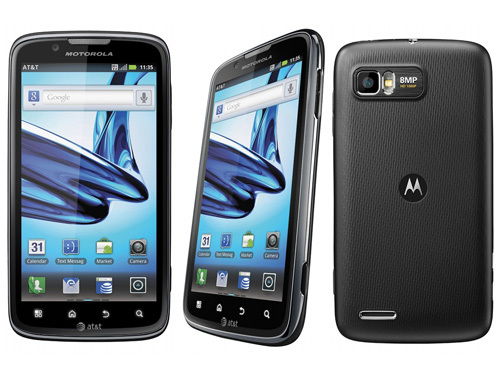
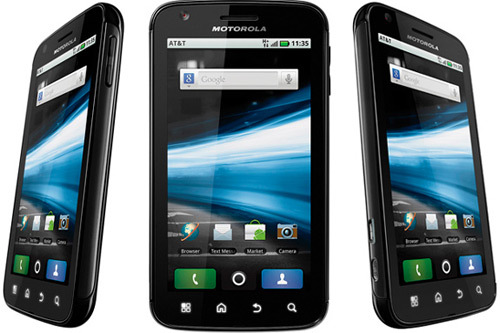
As a phone, the Motorola Atrix is one of the most powerful phones we've tested. With that dual-core processor and 1GB RAM, there's ample grunt to maintain a smooth interface.

It also grants you the luxury of hi-def video playback direct to your TV via the HDMI connection. Angry Birds on the big screen, anyone? It runs on Android 2.2 rather than the latest 2.3, but we won't slap it down too much for that. At a glance could be mistaken for any one of a number of decent handsets from LG or HTC.

Docking in
But what sets the Atrix apart is its ability to dock with the custom-built Lapdock to transform itself into a computer. The Lapdock is like a stripped-down laptop - screen, keyboard, trackpad and a pair of USB ports, but that's it. The Atrix does everything else: processing, OS, storage, the lot.

Once you're docked, you get a Linux-based WebTop OS which includes proper Firefox for full-fat browsing. It's a technical marvel and supports the latest internet standards, but the lack of multi-touch gestures or a scrolling edge on the trackpad make page navigation hard work without a mouse.

You'll also notice a simulation of the phone's screen on the desktop. It's weird poking a windowed phone screen via a trackpad, but it does mean you can use the social networking widgets that come with the Motoblur Android skin, along with all the VoIP apps you can download from the Android Market. There's no webcam, but you can make speakerphone calls.

Limited concept
There are limits to this “phone as a computer” concept. There's file management for your phone and any USB-connected storage, and you can edit documents via the likes of the bundled Quickoffice Pro, but it's painfully slow and fiddly. Media playing is a happier affair, aided by a music, movie and picture browser.

If you don't fancy the Lapdock (and in case you hadn't guessed, we don't), there's also the option of plopping the phone into a multimedia dock that outputs via HDMI to a TV, using the same media-playing interface as in Lapdock mode. The addition of USB ports on the multimedia dock makes this a reasonably compact way of viewing video from USB sticks on a TV.

Review continues after the break...

While we applaud the concept and the fact that Motorola has actually followed through with a final product, sadly it doesn't really come off. Physically, it's not the most elegant solution, and once you are set up with the Lapdock you'll probably be left wondering why you didn't just use a netbook instead.

That shouldn't put you off the phone as a standalone item. Beneath the toughened 4in Gorilla Glass is an impressively detailed 960x540 display that compares well with the Super AMOLED screen of Google's Nexus S: it's crisper, it matches the Nexus's black depth and it provides superior, super-bright whites. It's great, and if it ran on Android 2.3 it would be in contention for a fifth star.

Comments

  1. jeanjoan421

    18 weeks ago

    my classmate's step-mother makes $70/hour on the laptop. She has been unemployed for eight months but last month her pay was $19899 just working on the laptop for a few hours. Go to this web site and read more http://www.bit90.com

  2. mash1000

    1 year ago

    Got one given to me. Battery life good if you turn off some of the goodies, otherwise a daily charge like most smart phones. Can't stand 'Motoblur' - branded waste of time. Added PC keyboard & dock are strictl a gimmick - it takes AGES to set up & then plug into telly. Have it as a phone only.

Add your comment

You must be logged in to comment

Buzz-o-meter

Buzz-o-meter: motorola atrix

  1. Click to see all coverage from Apr 05, 2013
    0
    April 05, 2013
  2. Click to see all coverage from Apr 06, 2013
    0
    April 06, 2013
  3. Click to see all coverage from Apr 07, 2013
    3
    April 07, 2013
  4. Click to see all coverage from Apr 08, 2013
    5
    April 08, 2013
  5. Click to see all coverage from Apr 09, 2013
    2
    April 09, 2013
  6. Click to see all coverage from Apr 10, 2013
    0
    April 10, 2013
  7. Click to see all coverage from Apr 11, 2013
    1
    April 11, 2013
  8. Click to see all coverage from Apr 12, 2013
    0
    April 12, 2013
  9. Click to see all coverage from Apr 13, 2013
    0
    April 13, 2013
  10. Click to see all coverage from Apr 14, 2013
    0
    April 14, 2013
  11. Click to see all coverage from Apr 15, 2013
    0
    April 15, 2013
  12. Click to see all coverage from Apr 16, 2013
    1
    April 16, 2013
  13. Click to see all coverage from Apr 17, 2013
    0
    April 17, 2013
  14. Click to see all coverage from Apr 18, 2013
    0
    April 18, 2013
  15. Click to see all coverage from Apr 19, 2013
    0
    April 19, 2013
  16. Click to see all coverage from Apr 20, 2013
    0
    April 20, 2013
  17. Click to see all coverage from Apr 21, 2013
    0
    April 21, 2013
  18. Click to see all coverage from Apr 22, 2013
    0
    April 22, 2013
  19. Click to see all coverage from Apr 23, 2013
    0
    April 23, 2013
  20. Click to see all coverage from Apr 24, 2013
    0
    April 24, 2013
  21. Click to see all coverage from Apr 25, 2013
    0
    April 25, 2013
  22. Click to see all coverage from Apr 26, 2013
    0
    April 26, 2013
  23. Click to see all coverage from Apr 27, 2013
    0
    April 27, 2013
  24. Click to see all coverage from Apr 28, 2013
    0
    April 28, 2013
  25. Click to see all coverage from Apr 29, 2013
    0
    April 29, 2013
  26. Click to see all coverage from Apr 30, 2013
    0
    April 30, 2013
  27. Click to see all coverage from May 01, 2013
    0
    May 01, 2013
  28. Click to see all coverage from May 02, 2013
    1
    May 02, 2013
  29. Click to see all coverage from May 03, 2013
    0
    May 03, 2013
  30. Click to see all coverage from May 04, 2013
    0
    May 04, 2013
  31. Click to see all coverage from May 05, 2013
    0
    May 05, 2013
  32. Click to see all coverage from May 06, 2013
    0
    May 06, 2013
  33. Click to see all coverage from May 07, 2013
    0
    May 07, 2013
  34. Click to see all coverage from May 08, 2013
    1
    May 08, 2013
  35. Click to see all coverage from May 09, 2013
    0
    May 09, 2013
  36. Click to see all coverage from May 10, 2013
    0
    May 10, 2013
  37. Click to see all coverage from May 11, 2013
    0
    May 11, 2013
  38. Click to see all coverage from May 12, 2013
    0
    May 12, 2013
  39. Click to see all coverage from May 13, 2013
    0
    May 13, 2013
  40. Click to see all coverage from May 14, 2013
    0
    May 14, 2013
  41. Click to see all coverage from May 15, 2013
    0
    May 15, 2013
  42. Click to see all coverage from May 16, 2013
    0
    May 16, 2013
  43. Click to see all coverage from May 17, 2013
    0
    May 17, 2013
  44. Click to see all coverage from May 18, 2013
    1
    May 18, 2013
  45. Click to see all coverage from May 19, 2013
    0
    May 19, 2013
  46. Click to see all coverage from May 20, 2013
    0
    May 20, 2013
  47. Click to see all coverage from May 21, 2013
    0
    May 21, 2013
  48. Click to see all coverage from May 22, 2013
    0
    May 22, 2013

Tech Specs

Bluetooth
Yes
Dimensions
63.5x117.75x10.95mm
Main camera resolution
5MP
Memory card type
microSD
Operating system
Android 2.2 Froyo
Screen resolution
960x540
Screen size
4in
Standby time
350 hrs
Talktime
530 mins
Weight
135g
Wi-Fi
Yes

Instant expert

Simon Osborne-Walker's picture

Simon Osborne-Walker

A note on UK pricing
You can get the keyboard, mouse and multimedia dock free on Orange's Panther 40 deal, but you'll have to fork out an extra £300 for the Lapdock. Get the Atrix on the £60/month Panther Extra 60 contract, and they'll add a Lapdock for £50. However, using your Atrix's 3G connection with the Lapdock counts as tethering - for which you get a stingy 250MB allowance.