Wanbo Vali 1 review: this compact projector shocked me with what you get for the money
Possibly the cheapest way to get a 180in picture

Stuff Verdict
A value-minded projector with wide-reaching streaming smarts and a simple setup. The Wanbo Vali 1 isn’t especially bright, though, and doesn’t punch above its weight on picture quality.
Pros
- Automatic image adjustment makes setup a breeze
- User-friendly Android interface with great app support
- Loud and surprisingly well-rounded sound
Cons
- Far from the last word in brightness, even for a budget projector
- Colours lack nuance
- Limited picture control settings
Introduction
Pop-up home cinemas haven’t been the exclusive domain of lottery winners for years at this point, but if you’ve not been paying attention, it’ll still come as a shock just how affordable lifestyle projectors have gotten lately. Wanbo might not be as big a name in the west as Epson, Samsung or even Xgimi, but its latest effort will set you back just $260/£269.
Seeing how the Vali 1 can project a Full HD image up to a massive 180in across, there’s little else that comes close to matching it for sheer scale. It doesn’t skimp on smart features or connectivity either, with baked-in Android TV and full-size HDMI. It might not have the portability of something like the Xgimi Mogo 4, but it’s practically half the price.
So long as you’re not fussed about 4K, could this be the temporary big screen upgrade your movie setup has been waiting for?
How we test projectors
Every projector reviewed on Stuff is put through its paces with a mix of film, TV and game content, using a combination of streaming services, Blu-ray and console games. We use our years of testing experience to judge picture and sound quality, ease of use, and value for money. Manufacturers have no visibility on reviews before they appear online, and we never accept payment to feature products.
Find out more about how we test and rate products.
Design & features: compact classic



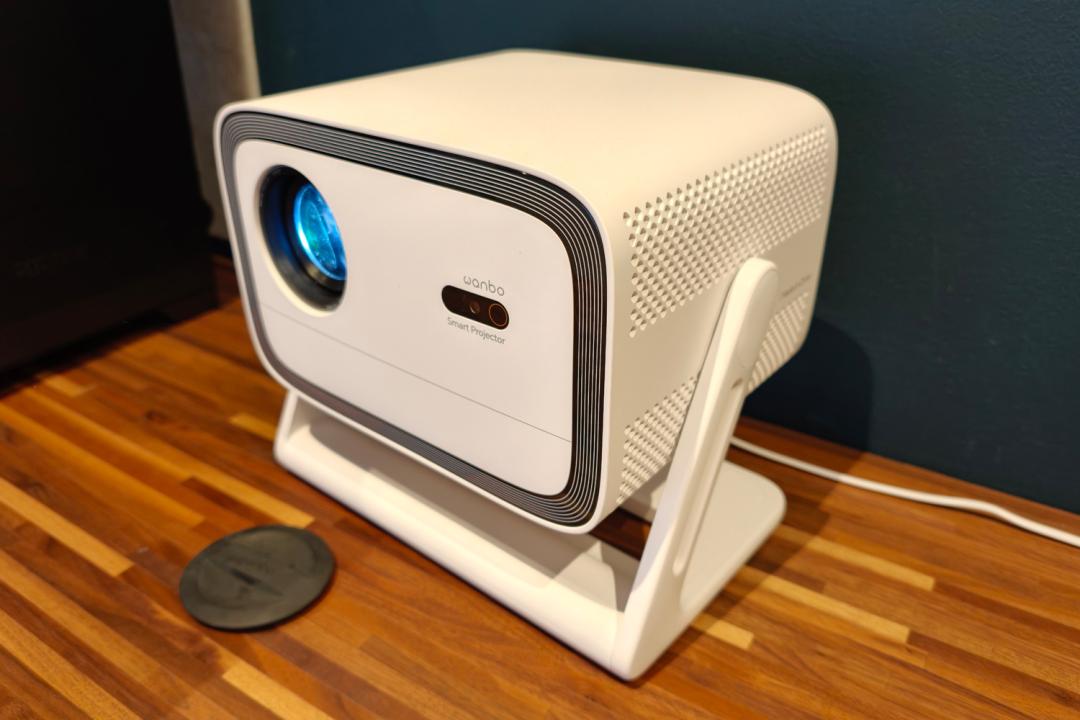
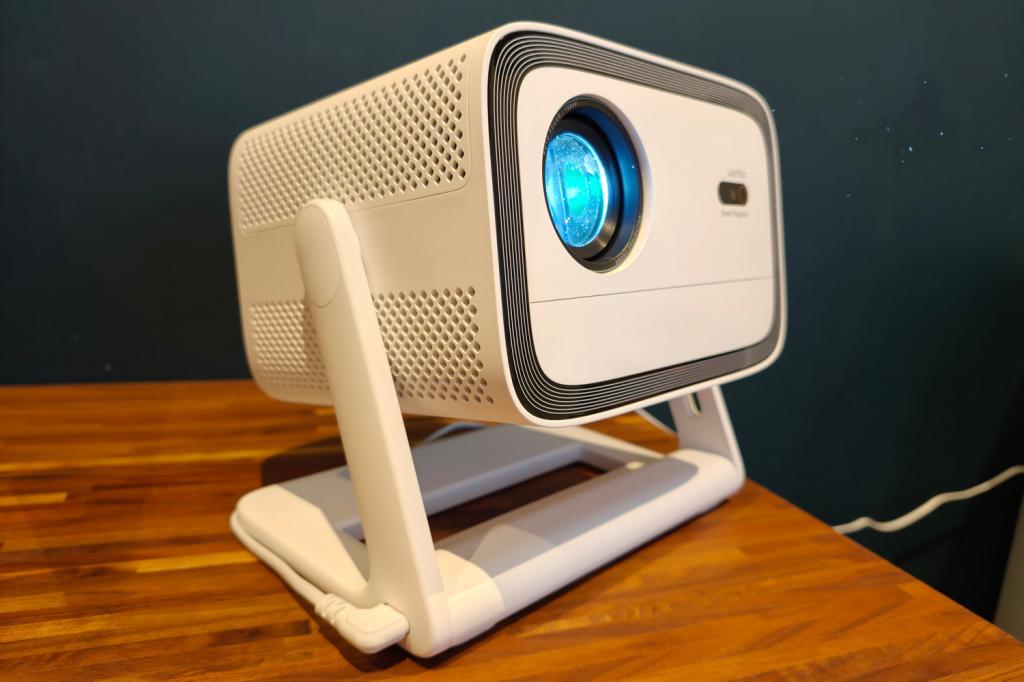
The Vali 1 doesn’t get too adventurous on the styling front, adopting the same clean lines and cube-like shape as most other lifestyle projectors. Subtle black trim lines around the front face are the only real design flourish. It won’t blend into your home decor like a pricier model wrapped in acoustic fabric, but I found it easy enough on the eyes.
It has a fairly compact footprint and at less than 3kg, moving it between different rooms was a breeze. The integrated stand is most at home on a tabletop, but also plays nicely with ceiling, wall, and free-standing floor brackets. It’s sturdy enough not to shake like jelly every time you walk past. 200 degrees of rotation adjustment means you don’t have to be ultra-selective about where you put it, though I wish there was some tilt adjustment to account for slightly wonky coffee tables and the like.
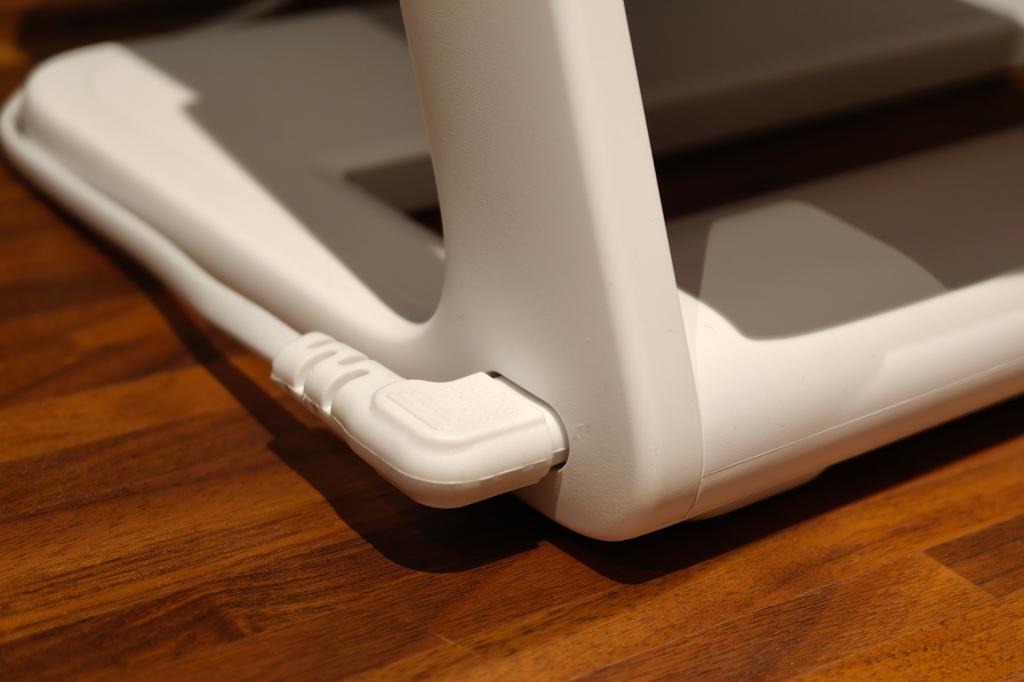
With no built-in battery, this is a strictly mains-powered system. The way the power cord plugs into the stand rather than the projector itself means you’re a little less likely to jostle the image out of focus with an accidental tug, though.
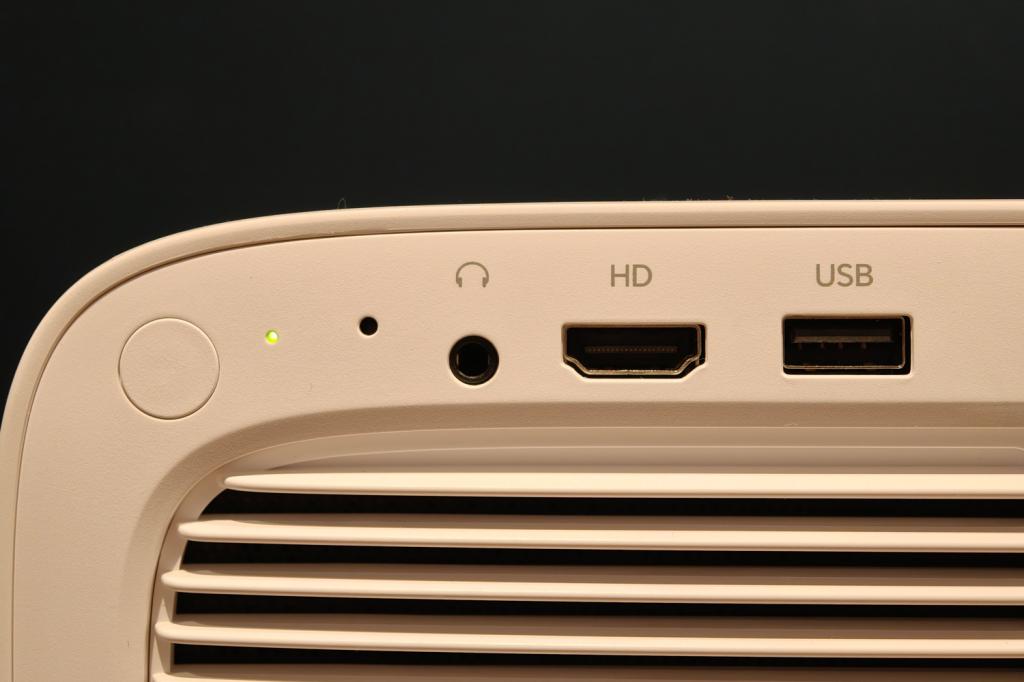
There’s a single HDMI input at the rear, along with a USB type-A port and a 3.5mm audio out. That’s good enough if you want to hook up a single games console, but you’ll need to look elsewhere if you’ve got a more comprehensive home cinema setup. Chromecast streaming is also on-board for wireless mirroring from a phone or laptop.
You won’t find many fun extras here, like the option to use the built-in speakers for Bluetooth playback when the projector’s lamp is powered down, but that’s not too surprising given the Vali 1’s budget nature. You do get an ambient mode, hidden away in the power menu, which projects calming scenes like snowy forests, mountain trails in the rain, or a crackling log fire.
Interface: Android TV all the way


The first thing you’ll see after powering on the Vali 1 (once the automatic calibration has done its thing) will be the Google TV setup screen. Hopping onto your home Wi-Fi and logging into your account is the work of a few minutes.
It all looks a little bare at first, with just Netflix, Prime Video, and YouTube preinstalled. The Play Store has an extensive selection of third-party streaming services, though. TV channel catch-up depends on where in the world you live: the UK isn’t very well served, with only Channel 5 showing up in search. BBC iPlayer, ITVX and Channel 4 were all missing. You’ll need to cast those from another device.
I didn’t find the interface to be especially responsive, taking a half-second to react to my inputs and search results taking longer to appear than they did on a Xgimi Mogo 4. Opening some menus would make playback stutter temporarily, too. Navigation is easy enough using the bundled remote control, though, and miles better than the in-house efforts found on similarly inexpensive rivals.
It doesn’t stray too far from the Google TV norm, with a circular D-pad, volume and playback controls, a dedicated Google Assistant button, and a bunch of content shortcuts. You can’t rebind these to anything other than the defaults, though, and the Disney+ button is essentially useless until you install the app manually from the Play Store. The keys don’t illuminate, and it takes two AAA batteries rather than being USB rechargeable, but I like how it can sit snugly inside the projector’s integrated stand when not in use, so you don’t misplace it.
Performance: the bigger picture


With auto-focus, auto-keystone correction and obstacle avoidance, setting up the picture really is fire-and-forget. It isn’t at all conservative with obstacles, either, getting as close as it can to things like light switches to maximise the viewable area. You’ll get the best results from a screen aligned perfectly with the projector, but the Vali 1 coped admirably with my white walls. It also stayed fairly quiet in operation, so you really won’t be bothered by the internal fans once a movie or game gets going.
Daylight testing with the blinds open suggests Wanbo’s claimed 900 lumens is a little short of the mark, with a slightly washed-out picture that couldn’t completely outshine the sun coming in through the window – and that was at a relatively close distance, for a roughly 50in image. For anything larger you’ll definitely need to keep the curtains drawn during the day.
In a darker room, the Vali 1 puts in a stronger effort. It’s here where the four different picture modes – Standard, Vivid, Soft, and User – reveal their strengths. Soft was my favourite for movies, being slightly less saturated for a more filmic look. Even Standard had quite vibrant colours, while Vivid goes hard, and is best reserved for animations or games. You don’t have much fine-grain control, with colour temperature being the other main setting to tweak. There’s one User mode, on top of Cool, Warm and standard presets.
Feed it a quality 1080p source and the Vali 1 delivers a clean, fairly detailed image. Contrast is decent for a budget projector – it’s not going to give a permanent 4K home cinema system any cause for concern, but darker scenes aren’t completely devoid of depth. For breaking out every once in a while to watch Netflix on a bigger screen than your TV, it absolutely gets the job done.
I was rather impressed by the two 6W speakers, which over-deliver on volume and have a surprisingly balanced tone. There’s just enough low-end to stop movie soundtracks from sounding tinny – though they won’t give even a basic soundbar a run for its money – and the high frequencies don’t come across as especially shrill or piercing either.
Wanbo Vali 1 verdict
If you’re after the biggest picture possible for the least amount of cash, the Vali 1 makes a strong case for itself. Few compact projectors can match its 180in maximum image, the Google-based interface is streamlined and there’s no shortage of streaming services available through the Play Store. The automatic calibration makes placement and setup as easy as it gets, too.
However, Wanbo’s brightness claims don’t quite tally with my testing, so this is definitely a curtains-closed viewing experience. Basic picture adjustment and somewhat crude colours are the biggest reasons to think about spending more – at which point rivals with built-in batteries start making more sense. I also think the smaller Xgimi Mogo 4’s extra features, like the ambient light mode and being able to double as Bluetooth speaker, justify the higher price.
That said, if you’ve got a specific spot in mind and don’t plan on any al fresco film nights, the Vali 1 could still be worth a look.
Stuff Says…
A value-minded projector with wide-reaching streaming smarts and a simple setup. The Wanbo Vali 1 isn’t especially bright, though, and doesn’t punch above its weight on picture quality.
Pros
Automatic image adjustment makes setup a breeze
User-friendly Android interface with great app support
Loud and surprisingly well-rounded sound
Cons
Far from the last word in brightness, even for a budget projector
Colours lack nuance
Limited picture control settings
Wanbo Vali 1 technical specifications
| Projection type | DLP |
| Resolution | 1920×1080 |
| Light source | LED |
| Brightness (claimed) | 900 lumens |
| Connectivity | Wi-Fi, Bluetooth, USB, HDMI, 3.5mm |
| Smart TV operating system | Android TV 11 |
| Dimensions | 254x228x189mm, 2.79kg |


 Tom Morgan-Freelander
Deputy Editor
Tom Morgan-Freelander
Deputy Editor