Roku’s grandest Home Screen update in a decade wants to get to know you
The new UI is arriving in the US now with other countries to follow. It's better at surfacing what you're in the mood for

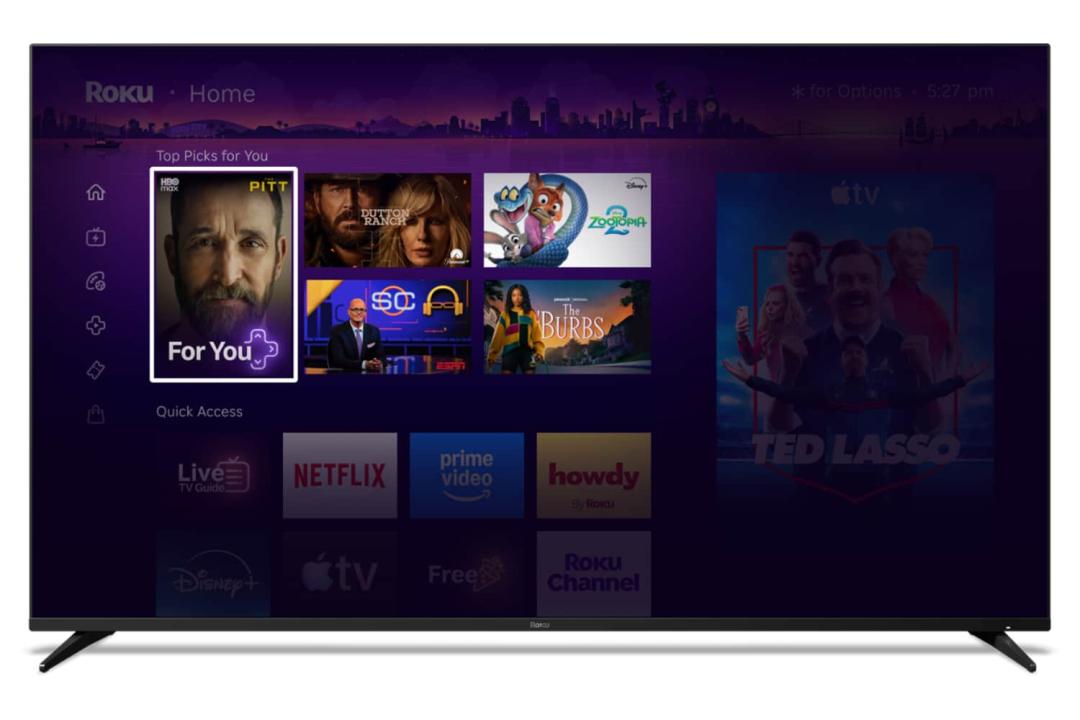
Roku has revealed a brand new look for the RokuOS, debuting the biggest home screen changes in more than a decade. The update is designed to make selecting what to watch “a lot” easier than before, with a focus on learning your streaming service behaviours to predict what you’re in the mood to watch.
If you watch reality TV in the evenings, sports on the weekend, or primarily use the same trio of streaming apps, Roku has developed a Quick Access interface showcasing those favourites. Better still, it adapts to your routine, so you won’t have to delve beneath the surface level to find the latest episodes.
That personalisation focus also transmits to a Top Picks For You section as the first thing you’ll see on the home page. This grid is unique to every user, based upon their interests, and regularly refreshes with new recommendations.
Roku is also debuting a feature called Destinations, which brings together content from different moods and genres. You’ll see content from all of the apps you subscribe to under headings like Kids & Family and New & Popular.
The Daily Scoop feature sounds a bit lame though. Roku says it’s an AI-powered “hourly guide to the cultural zeitgeist.” Get out of here! It “brings you a curated digest of breakout shows and cultural trends. Whether it’s a massive premiere, a celebrity birthday, or that viral moment everyone is talking about.” Sounds like a shortcut to awful.
The company is also hiding the home screen menu option, so they only rock up when you need to see them. Roku says it clears the decks for discovery. The company is also adding easy to each Shortcut – like Continue Watching, Sleep Timer, Save List. Frequently used shortcuts will take residence in the Quick Access panel.
The new home screen is rolling out now in the United States with other countries to follow. It’ll arrive automatically.


 Chris Smith