Apple iOS 6 – need to know

Apple has touted over 200 new features for its latest iteration of its mobile OS – iOS 6. We've rounded up the best of them for you to sink your teeth into.
UPDATE: Read our in depth iPhone 5 review

iOS 6 – Maps
Apple cuts its mapping ties with Google and goes it alone with a Yelp-powered list of over 100 million businesses, live crowd-sourced traffic reports and turn by turn navigation. Siri is also present, offering the ability to answer questions like 'are we there yet?' and tell you where the nearest petrol station is. A 3D mode called Flyover looks impressive, with nicely detailed 3D renders of key cities around the world. Take that Google.

iOS 6 – Siri
First things first, Siri will be available on the new Apple iPad 3 once it's updated to iOS 6. While original and iPad 2 owners cry out in anger, we'll move straight on to Siri's new features.
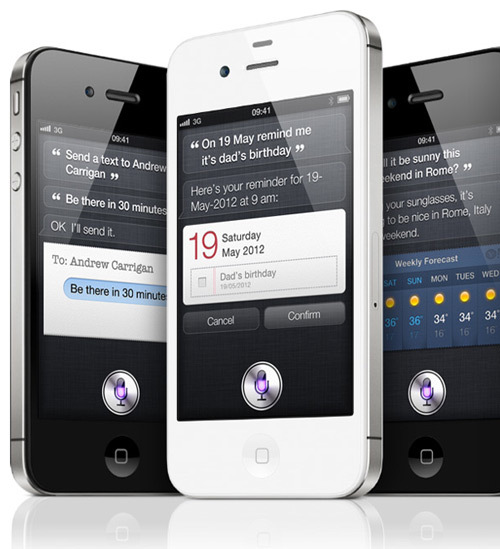
Siri can now open apps, check live sports results and check movie listings and reviews from Rotten Tomatoes. You can even book a table at a restaurant courtesy of OpenTable. Classy, no? And Siri will also be appearing in the new iPod Touch – read about it in our iPod touch story.

iOS 6 – Facebook integration
Following in the footsteps of Twitter, Facebook has been given a deeper integration into Apple's latest version of iOS, with contact integration and support for Facebook messages now present. The Notification Center will also be getting a nice new 'tap to post' button, for quick and easy status updates without having to fire up the Facebook app. Birthdays will be integrated into the calendar (ideal for the forgetful among you) and you can also share which apps you're a fan of directly from the App Store.

iOS 6 – FaceTime over 3G
As previously rumoured, FaceTime calls can now be made over 3G, freeing Appleites from the shackles of Wi-Fi. It's about time. Also, if someone calls or texts your phone number, you can now choose to respond directly from your Mac or iPad, which is a nice touch.

iOS 6 – phone features
A new 'Do Not Disturb' mode will let you block all incoming calls and messages according to your schedule, although you can make exceptions if someone rings twice within a certain time period (most likely telling you that little Timmy has fallen down a well again). Another feature has also been added which has been standard in other phones for a while now – the ability to text replies from the call screen to let callers know why you can't take a call.
- 1


Comments
markster1971
49 weeks ago
well after all the hype for this wwdc. what no iphone 5. shock there. well not really.
sauspud
49 weeks ago
Nice to see Apple playing catch up. Nothing in that list that I havent been able to do on my Samsung Galaxy S I for the last two years. At least the iSheep will have less things to be jealous of now. Except the awesome S III.
FlyerSG
49 weeks ago
SMS delivery receipts, please. Every other mobile phone on the planet has it, but not Iphone. Embarassing if they don't put it into IOS 6 finally.
daff
49 weeks ago
agree with this..
Big Supes
36 weeks ago
iOS 6 gets Facebook integration and 'tap to post'... whoahooooo! 2010 says hello.
Sent from my Windows Phone
;)
stjohn_rowlands
35 weeks ago
"Microsoft's Windows Phone trounces iOS 6", Pocket Lint. I simply point that out as you've taken similar quotes from the same source slightly out of context elsewhere and perhaps have over prioritised ad revenue and influence over journalism. That said if your crazy about iOS6 I salute you for sticking to your guns.
grahamthompson1978
35 weeks ago
So, iOS 6 is here.
And, as is sometimes the case, it's the little things that make all the difference: being able to use Siri on my iPad is great, more iCloud integration for Safari bookmarks and tabs, integration for Messages and Contacts. Posting to Facebook & Twitter without opening the apps. Sharing PhotoStreams with friends. All good!
The nay-sayers and Apple-haters will berate this version of iOS as pointless. The overall look of the UI hasn't changed, they'll say there's no Live Tiles, no NFC. They'll argue that Apple are churning out the same old rubbish that was first introduced with the first generation iPhone. And they have a point. But my argument is that this isn't necessarily a bad thing. The old adage rings true, if it ain't broke, don't fix it.
The UI on iOS 6 is just as user friendly and intuitive as it was on the first generation iPhone. As a long-serving Apple fan I've always liked the simplicity of the UI, way back to the first Apple Macintosh desktop (which, if you look closely hasn't really changed even in the most up-to-date MacBooks and iMacs). The reason it hasn't changed is that it doesn't need to. It just works and it still looks good all these years later. If I wanted some "bling" I'd buy one of those nasty little plastic and glass Android and Windows smartphones or tablets. I could "pimp" my UI with LIve Tiles, change all my icons to some cartoon version of the latest craze, see messages and photos magically rotate around my screen. But thankfully I'm an adult with simple tastes. I choose design and useability over flashing lights and gimmicks. I pay more for my Apple product because I know it's worth it. The intricacy of the design and its eye-catching looks coupled with the user-friendly nature of the UI and the fact that it just does exactly what I need it to do, subtley, quietly, professionally. Or at least it used to....
With every Apple product launch I've waited with baited breath for the new killer feature. The thing that advances my iThing to another level. That will aid my daily routine, make my mundane existence more pleasurable. That makes life slightly better. And I thought I had it. The launch of iOS 6 promised so much. Subtle, hard-to-fathom-the-usefullness-of-until-you-try-them things. That same over-arching Apple ethos to make life easier. Until I saw the abomination that is.... Apple Maps! For the love of all that is good, why??? Not only is the information in many cases, how do I say it? Wrong! But have you seen the so-called Satellite imagery? Was it foggy when the satellite passed-by? The detail is next to useless as the imagery is so grainy.
And sadly my disappointment didn't end there. One of my favourite apps has just gone. After years of just being there YouTube is no more. Unlike Google Maps it hasn't been replaced (probably for the best!) with some inferior substitute. It just ceased to exist. Gone. No fanfare. No farewell. Just. Gone.
And then my "strike three" moment. Safari has gone the way of Mountain Lion and just stopped offering built-in RRS Reader support! Why do this? What was the motivation behind removing RRS reader support? Why is there no Apple-designed alternative? Do Apple really think we don't use it even though they have RRS feeds on the Apple website? Now Safari is just like all those other browsers. Except that with Google Chrome you can use the Google Reader.
Alas, my enthusiam for the new OS was short lived. I've been duped into thinking that Apple "got me" and all that I wanted/needed/desired in a phone/tablet/computer. For years they did. Now....
Well, one can only hope that they see sense and start moving iOS 6.1 forwards instead of backwards. Just don't leave it too long Apple 'cos I loved my YouTube, Google Maps and built-in RRS reader browser. And where can I get a phone/tablet that offers all that I wonder......???