Sony Vaio Z 2011 hands-on
Sony's MacBook Air rival shows up with a monolithic Thunderbolt dock in tow

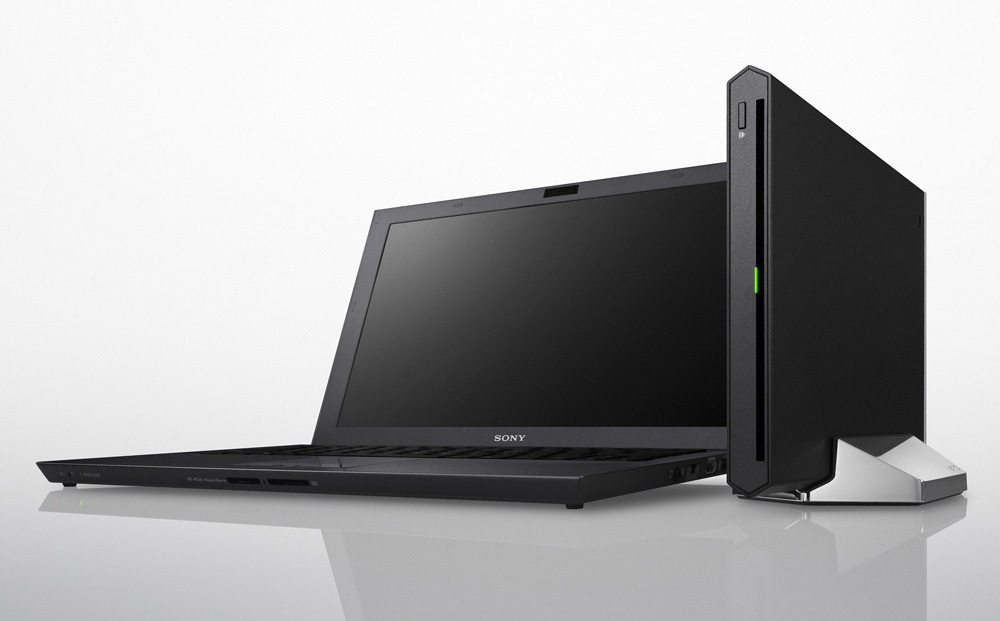
Stuff had a tinker with the latest Sony Vaio Z series laptop yesterday, the 13in VPCZ21V9E. It’s all solid-state, so that means no hard disk and no optical drive (at least in the laptop iteslf). Like Apple’s MacBook Air, this allows it to spring into action much more quickly than your average laptop, and with a mobile Sandy Bridge Core i7 processor for a brain, waiting time is reduced further still.
Power Media Dock
The thing sitting next to it is called a Power Media Dock. It hooks up to the laptop via a propriatory connection based on the super-fast, super-versatile Thunderbolt tech used in the latest Macs.
Not just a monolithic face
The dock is primarily an optical drive, which can be specced with either a standard DVD writer or Blu-ray deck. But there’s more to it than just an external disc drive, as we’ll see when we poke our camera round the back…
Unless you’re much mistaken, you’ll see USB 2.0 and USB 3.0 ports, Ethernet, HDMI and good old fashioned VGA. Have a closer look, why don’t you?
Off to see the multiple-screen Powerpoint presentation Wizard
That HDMI port can drive up to four displays. It’s the sort of thing the Wizard of Oz would have used if it had been around in 1939. And if compatible displays had also been invented.
VGA Appreciation Society
Back to the laptop, and as you can see from that VGA port it’s not going to win any flatness competitions. It’s 16.65mm thick when closed up, so not bloated by any means, and cloaked in quality materials.
The numbers
Specs? OK, if you insist. Core i7 2620M @ 2.7GHz, Intel HD Graphics 3000, 256GB solid-state drive, 8GB of RAM, 1600×900 13in display. Full review to follow soon.
Icon – Pentax 645D Japan
More computer and console news


 Dan Grabham
Editor-in-Chief
Dan Grabham
Editor-in-Chief