Sony Vaio L Series all-in-one hands-on

23 Feb 2011

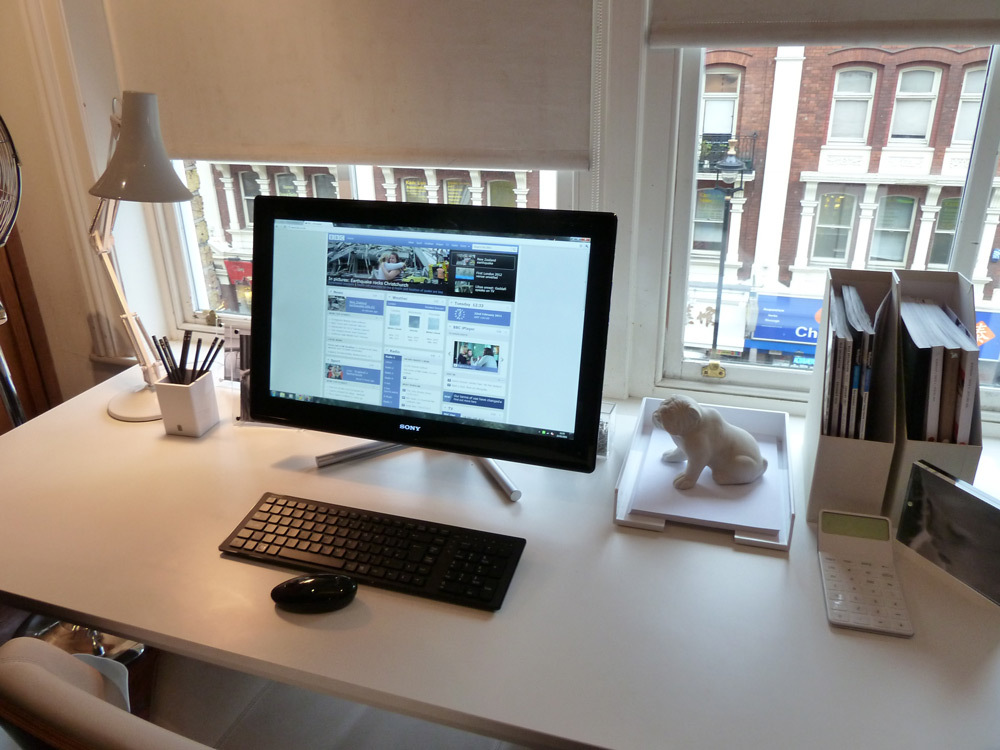
At Sony’s latest Vaio launch event they expressed that users had found the 24” touchscreen L Series wasn’t big enough for accurate touch controls. The ever patient Sony simply nodded and fixed the problem. Edge Access touch controls have been added into the surrounding bezel of the latest edition to rectify the dire problem plaguing those with chubbier fingers.


Using the flush black bezel controls you can keep your HD screen smudge-free. Now, to zoom in and out simply slide your finger up and down the right of the black bezel; to navigate forward or back tap the bottom left or right; to access the on-screen keyboard just tap the left of the bezel. You can even access the media centre by tapping the top right, or display all open windows with the bottom left. And if it’s all a bit hard to remember at first, a tap at the bottom right will reveal the bezel controls on-screen. It does really work and is useful, presuming you aren’t sitting back using the supplied wireless mouse and keyboard.

It may look simple on the outside but this PC is kitted out for anything. It comes with a multi-touch HD screen, an HD webcam powered by Exmor –­ what Devon has to do with it we don’t know – S-Force 3D sound, an i7 Core with 8GB SDRAM and 1TB Serial ATA, a Blu-ray burning Multi Drive, and WEB access from off in 15 seconds.


With 24” at your disposal it would be a shame to use it only as a PC. So, Sony lets you use it as a monitor without booting up the PC itself. The PS3 is the device recommended but, of course, other HDMI sources are optional if a pure Sony lounge isn’t your thing. The device is due out in May so keep your eyes peeled for a full review on Stuff.tv.


Comments

  1. ankajo

    2 years ago

    Got model VGC-LV1S specs are nearly the same. Great performer,excellent video replay and full HD Blu- Ray.just love it.

  2. mickeychan

    1 year ago

    Well, I can not run the videos contained in this website. And I really want to study this in great detail and depth. memory foam mattresses

  3. AdamAbigail

    1 year ago

    There are so many kinds of monitor with a good technologies. And this one is using a touch screen LCD.
    delta airlines credit cards

  4. petermarco

    1 year ago

    Well, i know this rumor for a long time. Sony vaio was a good laptop for businessman, not for a multimedia lover. I prefer using msi or asus.
    memory foam mattresses, adjustable bed

  5. kathyink

    1 year ago

    The feature on 'Sony Vaio L Series all-in-one hands-on' is amazing. The article serves as a useful guide to teach us how to use the product. The photos of the Sony product look good and attract many to check it out. If you want to have a hard copy of any image or any document stored in the PC you can link it to a printer with inkjet cartridge.

Add your comment

You must be logged in to comment