App of the Week – Music Beta by Google
Google takes aim at iTunes with an impressive tune-napping cloud music service

Platform: Android 2.2+
Price: Free
I can’t be the only person who chose an iPhone, in part, because I had tens of thousands of songs, ratings and playlists locked away in iTunes. But those days are over. Google’s new cloud music service, currently only available in the US, will send shockwaves through Cupertino by letting iTunes users enjoy their music (including playlists) on Android devices.
Music beta by Google (MBG) is a typical stripped-down Mountain View product. Grab one of the sought-after invites, download the lightweight Music Manager and it starts scouring your hard drive for music. It sniffs out tunes from iTunes, Windows Media Player or your My Music folder and uploads them to the cloud. You’re allowed up to 20,000 songs, although forget about uploading Apple DRM and Lossless files. Apple’s five-star song ratings are translated into a basic thumb up/thumb down.
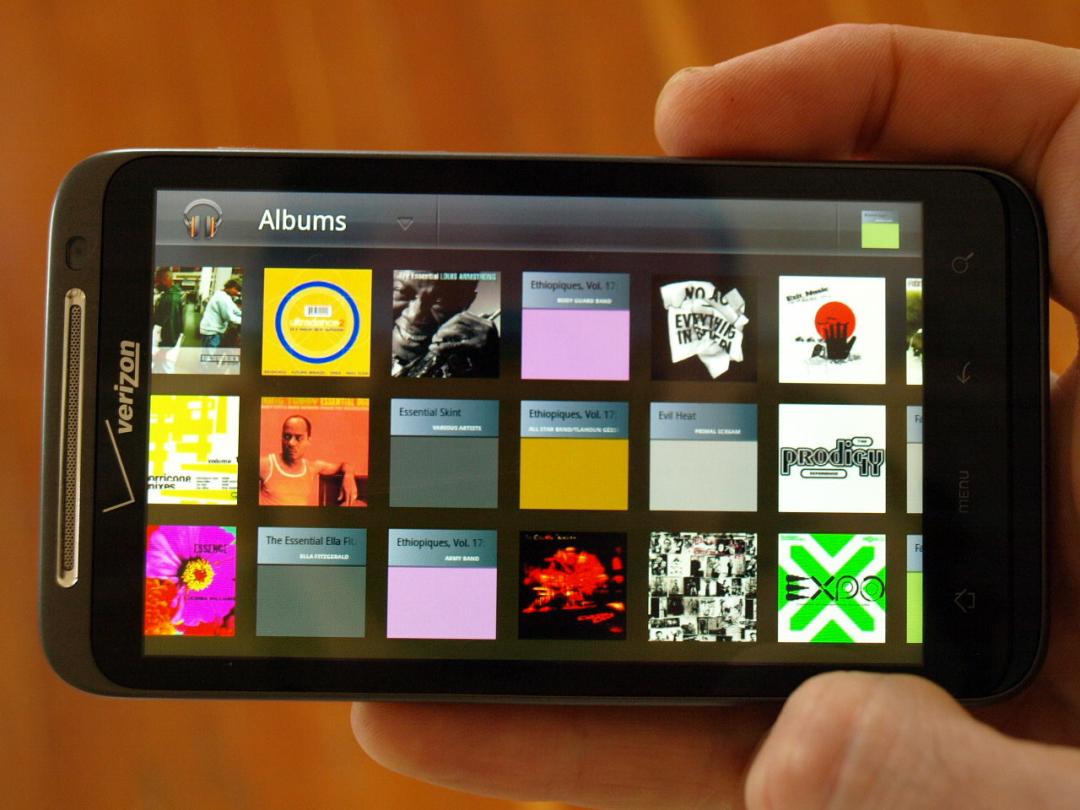
You can then access and listen to your tunes through any web browser or, even better, through the Music Android app. This simple app shows your music sorted by artist, album, song title, playlist or genre, looking for all the world like a low-rent rip-off of Microsoft’s troubled Zune player. The currently playing song lurks at the bottom of the screen, with pause/skip controls.
Album covers fly past in a 2D pseudo-cover flow (landscape) or an alphabetical list (portrait). Clicking on any song lets you play it, streaming instantly from the cloud, or add it to a playlist. You can also create a Genius-style Instant Mix that gathers together similar music from your library or shop for the song on Google (a bit weird, seeing as you already have the song in your collection).
Audio quality is great and it’s hard to fault the ability to play full iTunes playlists, with all synching happening in the background. But there are a couple of annoyances. For a start, it’s almost impossible to stop the Music Manager uploading your songs after it’s started; and playback in the app occasionally defaults to the first song in your library, for no good reason.
Ultimately, though, Apple should be very scared. Even in its current raw state, MBG is an app that unleashes iTunes music without the pain and misery of dealing with iTunes itself. It gives users access to their entire library without clogging up their phone’s memory or having to laboriously synch long playlists. Every day that this app is up and running without Apple offering its own music service, is a day that the iPhone’s previously unchallenged superiority as a music device looks less and less assured.


 Sam Kieldsen
Contributor
Sam Kieldsen
Contributor